Online Securities Trading Service Upgrade

To enhance service quality, we will be upgrading our online securities trading services in batches starting from 1st November 2025, enabling you to experience a simpler, faster, and more secure one-stop mobile banking experience anytime and anywhere.

The service upgrade includes:

  1. The SC Equities app will be integrated into SC Mobile App. You can access online securities trading services by entering the “Invest” tab of SC Mobile App and selecting “Equities“. This service upgrade provides a clear overview of all your accounts, enabling you to stay updated on your account status and access various banking services. With a single app, your daily banking and securities trading needs are now more convenient.
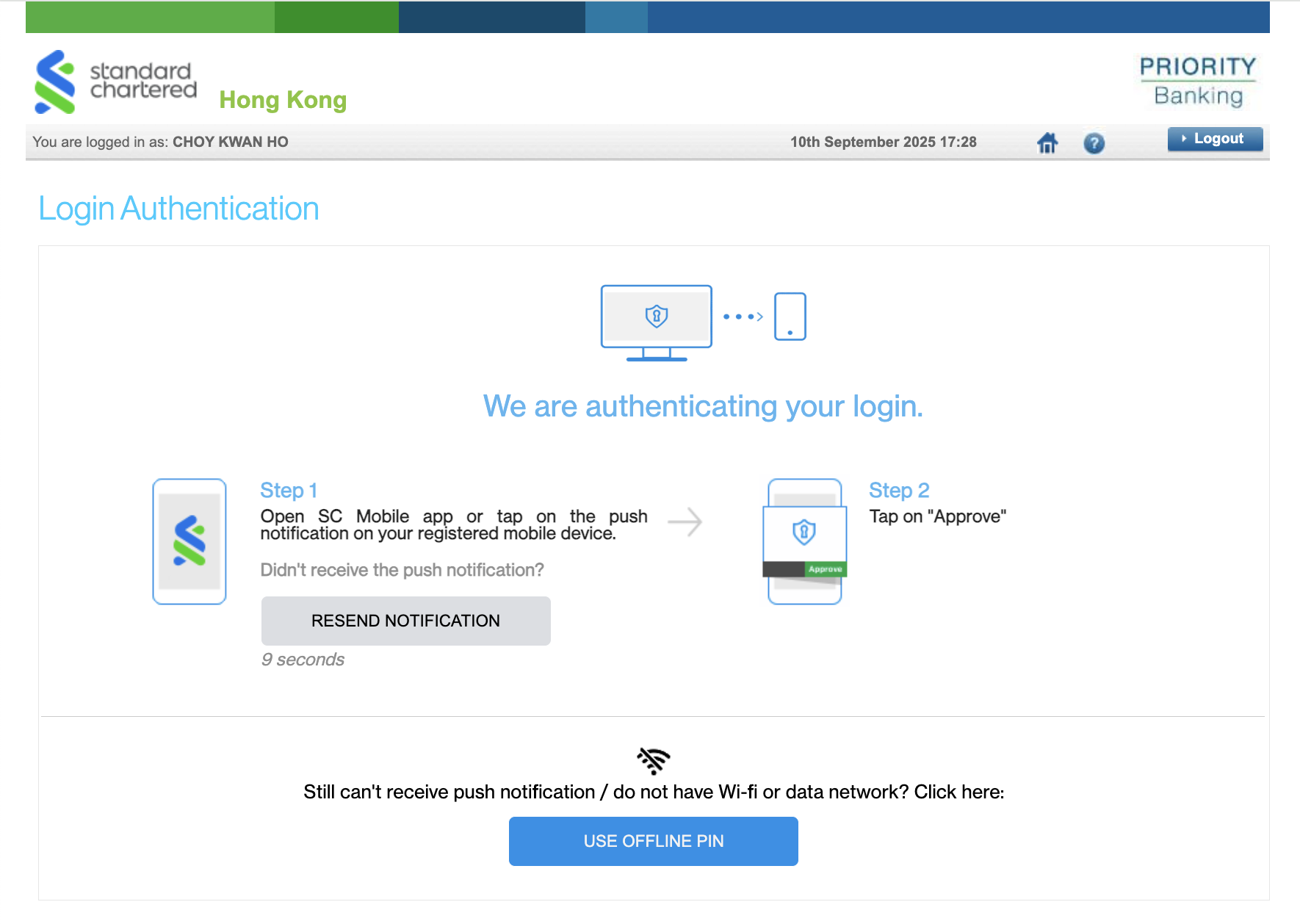
  2. Additionally, when logging into the Online Securities Trading platform, we will adopt the SC Mobile Key, a virtual security token in SC Mobile App to authenticate online login. You will no longer need to wait for an SMS one-time password (OTP) and provides an additional layer of login security. Once authenticated, you will be able to access the Online Securities Trading platform.

Download SC Mobile App and register your SC Mobile Key for login and authentication after the upgrade.

Steps to login to online securities trading services

Download SC Mobile App and register your SC Mobile Key for login and authentication after the upgrade.

After the upgrade, you may login to online securities trading services via the following channels:
SC Mobile

Online Securities

  • Hk wm osts scmobile step en
  • Hk wm osts scmobile step en
  • Hk wm osts scmobile step en

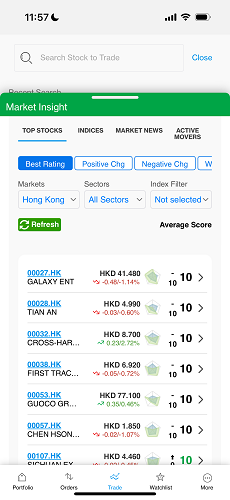
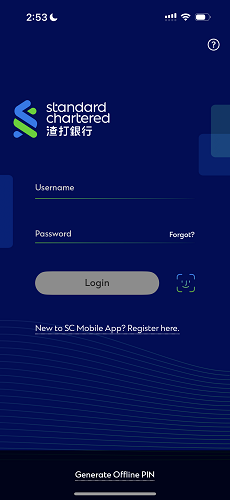
Login online securities trading services through SC Mobile App

Step 1

Login to SC Mobile App with your username and password

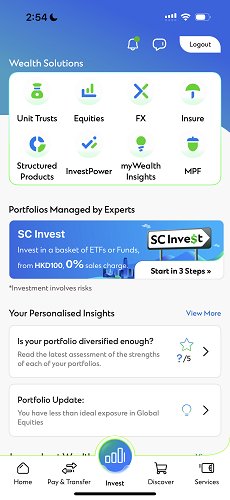
Step 2

Select “Invest” tab and then “Equities”

Step 3

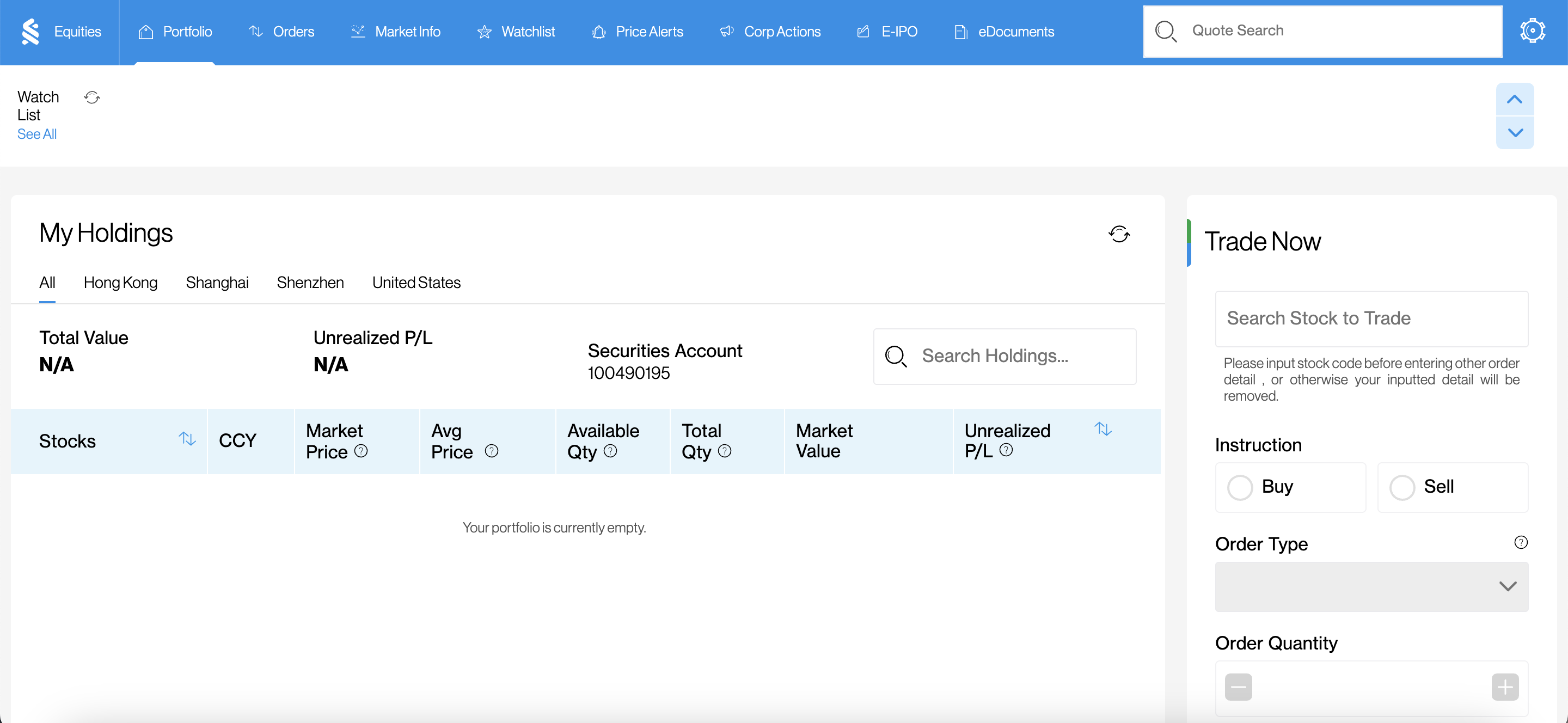
Successfully login to Online Securities Trading services

  • Hk wm osts online step en
  • Hk wm osts online step en
  • Hk wm osts online step en
  • Hk wm osts online step en

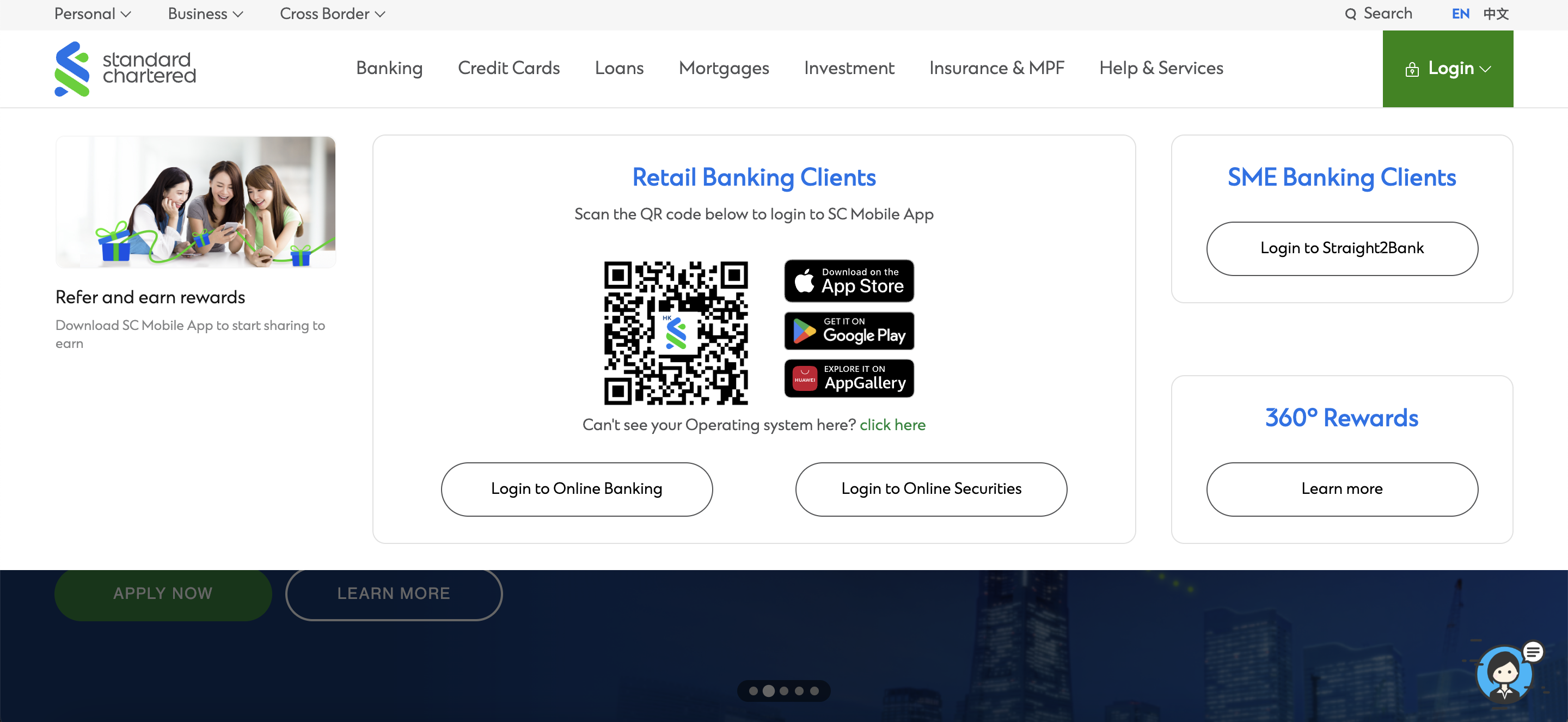
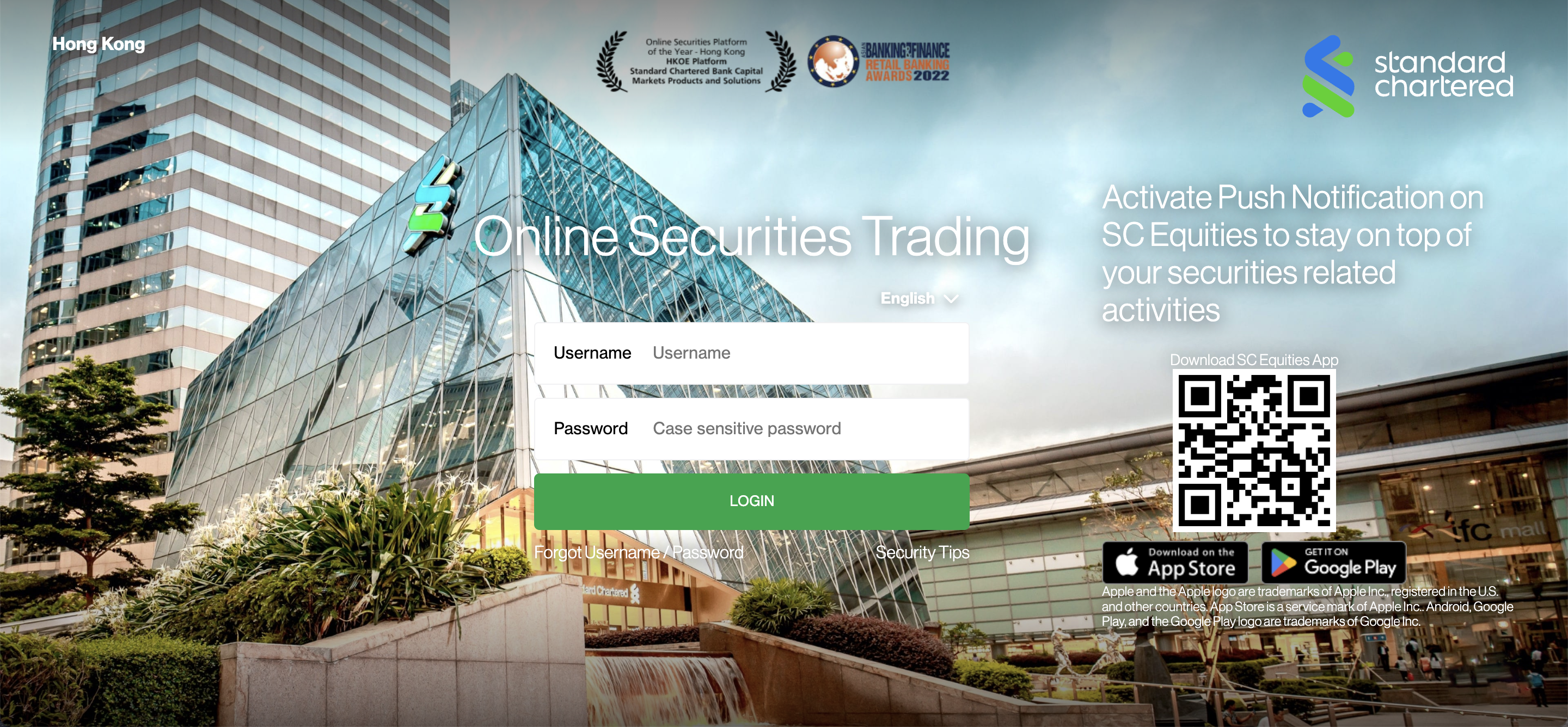
Direct login to Online Securities Trading platform

Step 1

Select “Login to Online Securities” at our website

Step 2

Login with your username and password

Step 3

Authenticate login with the virtual security token SC Mobile Key in SC Mobile App

Step 4

Successfully login to Online Securities Trading platform after authentication

This upgrade will integrate SC Equities into the SC Mobile App, enabling you to fully access a wide range of banking and securities investment services through a single SC Mobile App, providing a simpler, faster, and more secure mobile banking and investment experience.

After the upgrade,

1. You can login to SC Mobile App and click “”Invest”” tab, “”Equities”” for online securities services. This upgrade provides a clearer overview of all your accounts, enabling you to stay informed on your account status and access various banking services. With a consolidated SC Mobile App, your daily banking and securities investment needs can be fulfilled more conveniently. Additionally, the SC Equities app will be discontinued.

2. Securely login to Online Banking and Online Securities Trading platform with SC Mobile Key, a virtual security token in SC Mobile App. You no longer need to wait for the SMS one-time password (OTP). Using SC Mobile Key to authenticate online logins provides you with an additional layer of security.

3. At the Notification Hub in SC Mobile App, you can access all push notifications related to the banking services and securities investment at any time, keeping you informed of your account status, various products and promotional offers.

4. If you have activated push notification at SC Mobile App, you will receive push notifications for your securities trading and other general banking services with your mobile device.

Starting on 1st November 2025, we will upgrade and integrate SC Equities into SC Mobile App in batches. When the upgrade takes effect on your account, you will see a pop-up message at your SC Equities with further instructions from us. You may follow the instructuions to login to SC Mobile App to access your online securities trading services.

No. We will automatically integrate SC Equities for you in batches starting from 1st November 2025. Once the integration is completed, you will see a pop-up message at your SC Equities with further instructions from us. You may follow the instructuions to login to SC Mobile App to access your online securities trading services.

We will automatically integrate SC Equities for you in batches. Once the integration is completed, you will see a pop-up message at your SC Equities with further instructions from us. You may follow the instructuions to login to SC Mobile App to access your online securities trading services.

No. Starting from 1st November 2025, we will automatically integrate SC Equities to SC Mobile App for all users in batches. Once the integration is completed for you, your SC Equities will cease service. You will see a pop-up message at your SC Equities with further instructions from us. You may follow the instructuions to login to SC Mobile App to access your online securities trading services.

All existing SC Equities functions, services, and interface will remain unchanged after the integration into SC Mobile App. The main difference after the integration is that the login application will switch from the existing SC Equities to the SC Mobile App. SC Equities will then cease service.

No. All previously placed instructions (e.g., trade orders) on ​​SC Equities will continue to be executed as normal. All existing SC Equities functions, services, and interface will remain unchanged after the integration into SC Mobile App. The main difference after the integration is that the login application will switch from the existing SC Equities to the SC Mobile App.

Yes, you can still trade through other channel(s) you applied at our Online Securities Trading platform and/or Securities Services Hotline.

i) If you already have a securities account with us and are our existing Online Securities Services customer, please use the same login username and password to log in our Online Securities Trading platform.

il) If you already have a securities account with us and are our existing Online Banking customer but have not yet started using our Online Securities Services Platform:
– Logon to existing Online Banking
– Choose the “”Securities Services”” icon on Left Menu
– Read through the Terms and Conditions for Online Securities Services and click “”Accept”” (for first-time login user) to acknowledge the acceptance of the Terms and Conditions for Online Securities Services
– Online Securities Services Platform will be displayed
– Once you become our Online Securities Services customer, please use the same login username and password to log in Online Securities Trading platform

iii) If you already have a securities account with us with a valid Phone Banking TIN but have not registered Standard Chartered Online Banking yet
– Please click on the icon “”New User Register Now”” on the Online Banking logon page
– Read through the Terms and Conditions for Tele-electronic Banking Services and click “”Accept”” to acknowledge the acceptance of the Terms and Conditions for Tele-electronic Banking Services
– After you have got access to Online Banking, please follow the steps as above in il)
– For any enquiries on Online Banking registration, you may learn more through our virtual assistant Stacy

iv) If you do not have a securities account with us or do not have a valid Phone Banking TIN or Phone Banking Card Number- Please visit any of our branches to open a securities account and/or apply for Phone Banking TIN or Phone Banking Card Number

After the upgrade, you can login to the online trading platform through the following channels:

1. Login to Online Banking and click “”Securities Services”” at the left menu, to access online securities services.

2. Login directly to Online Securities Trading platform to access online securities services.

3. Login to your SC Mobile App and click “”Invest”” tab, “”Equities””, to access online securities services.

You may log in to Online Banking with your username and password as usual. However, you no longer need to wait for an SMS one-time password (OTP) to authenticate your login. We will fully adopt SC Mobile Key*, a virtual security token in SC Mobile App, to provide you with a more secure channel to log in to Online Banking.

After logging in, you can access to online trading platform by clicking “”Securities Services”” at the left menu.

*If you haven’t registered SC Mobile Key yet, you have to download SC Mobile App, and you may refer to Standard Chartered HK website “”Help & Services”” for the registration instructions. Registration can only be completed at SC Mobile App.

You may login to the online trading platform with your username and password as usual. However, you no longer need to wait for an SMS one-time password (OTP) to authenticate your login. We will fully adopt the SC Mobile Key*, a virtual security token in SC Mobile App, to provide you with a more secure channel to log in to the online trading platform.

*If you haven’t registered SC Mobile Key yet, you have to download SC Mobile App, and you may refer to Standard Chartered HK website “”Help & Services”” for the registration instructions. Registration can only be completed at SC Mobile App.

After the integration of SC Equities into SC Mobile App, the SC Equities application will cease service. You can access the online trading platform by logging into SC Mobile App* and select “”Invest”” tab, then “”Equities””. This service upgrade will provide a clearer overview of all your accounts, enabling you to stay informed and access a variety of banking services. With a consolidated SC Mobile App, your daily finances and securities investments are now more convenient.

*For first-time users, you have to download SC Mobile App and register your virtual security token, SC Mobile Key to log in. Registration can only be completed at SC Mobile App.

If you do not have Wifi / data network, you can still login to Online Banking or the Online Securities Trading platform, by generating offline PIN via SC Mobile App. You may refer to Standard Chartered HK website “Help & Services”, for details of generating offline pin.

Push Notifications on the SC Mobile App is free. This service is designed as an alternative channel to SMS, to alert you to activities related to your SCB accounts. For the detail of available alerts, please refer to Standard Chartered HK website “Help & Services”.

To turn these notification services on, please follow the instructions in Standard Chartered HK website “Help & Services” to turn on with your mobile device.

You can receive the Push Notification only when you are connected to Wi-Fi or data network. After reconnecting to Wi-Fi or data network, you may find the push notification triggered, at the Notification Hub after logging in SC Mobile. For details, please refer to Standard Chartered HK website “Help & Services”.

If you have activated push notification at SC Mobile App, you will receive push notifications for your securities trading and other general banking services with your mobile device.

You can access the push notifications related to the general banking services and securities trading at any time at the Notification Hub of SC Mobile App, enabling you to fully understand the status of all your accounts, various products and promotional offers.

For the steps to download the latest version of SC Mobile App, you may refer to Standard Chartered HK website “Help & Services”.

For the steps and details of registering SC Mobile Key, you may refer to Standard Chartered HK website “Help & Services”.

  • This website does not constitute any prediction of likely future price movements.
  • Investors should not make investment decisions based on this website alone.
  • This website has not been reviewed by the Securities and Futures Commission or any regulatory authority in Hong Kong.

Risk Disclosure Statement for Stock Investment Services

  • Investment involves risks. The prices of stocks fluctuate, sometimes dramatically and the worst case may result in loss of your entire investment amount.
  • Past performance of any stocks is no guide to its future performance. Investors should consider their own investment objectives, investment experience, financial situation, risk tolerance level and carefully read the Terms and Conditions of relevant Stock Investment Services before making any investment decision.

Important Notes of SMS/Email Communications

  • Client is responsible for charges that may be imposed by individual mobile network operator (including but not limited to roaming service charges).
  • You will not receive a personal call to inform you of your order status if you have enrolled for SMS/ email order confirmation or placed your order through the online channel. Please use order status enquiry function to check the updated status of your order.
  • SMS order confirmation and price alert services require pre-registration and are subject to relevant Terms and Conditions.
  • Standard Chartered Bank (Hong Kong) Limited (the “Bank”) gives no warranty as to the timeliness or reliability of the SMS/ email communications and shall have no liability in the event that the client fails to receive such communication.

Important Notes of Online Stock Trading and SC Equities

  • The Bank will not be liable for any loss or damage to you as a result of making the Online Stock Trading Services available to you, unless the loss or damage is directly caused by our negligence or our willful default.
  • For more details and the risks involved, please refer to the Stock Investment Services Terms and Conditions or contact our branch staff.

Stock Investment Services Terms and Conditions

Download here

You’re about to leave our website

This hyperlink will bring to you to another website on the Internet, which is published and operated by a third party which is not owned, controlled or affiliated with or in any way related to Standard Chartered Bank (Hong Kong) Limited or any member of Standard Chartered Group ( the “Bank”).

The hyperlink is provided for your convenience and presented for information purposes only. The provision of the hyperlink does not constitute endorsement, recommendation, approval, warranty or representation, express or implied, by the Bank of any third party or the hypertext link, product, service or information contained or available therein.

The Bank does not have any control (editorial or otherwise) over the linked third party website and is not in any way responsible for the contents available therein. You use or follow this link at your own risk. To the extent permissible by law, the Bank shall not be responsible for any damage or losses incurred or suffered by you arising out of or in connection with your use of the link.

Please be mindful that when you click on the link and open a new window in your browser, you will be subject to the terms of use and privacy policies of the third party website that you are going to visit.

Proceed to third party website