
 Straight2Bank

Octopus top-up made easy
Octopus Wallet
Top up your Octopus instantly and conveniently from different methods
-

Top up your Octopus Card directly
-

Top up your Octopus Wallet from your credit card
From SC Mobile App or Online Banking, you can top up from your credit card with just a few taps.
Top up Octopus Card through FPS from Octopus App
-
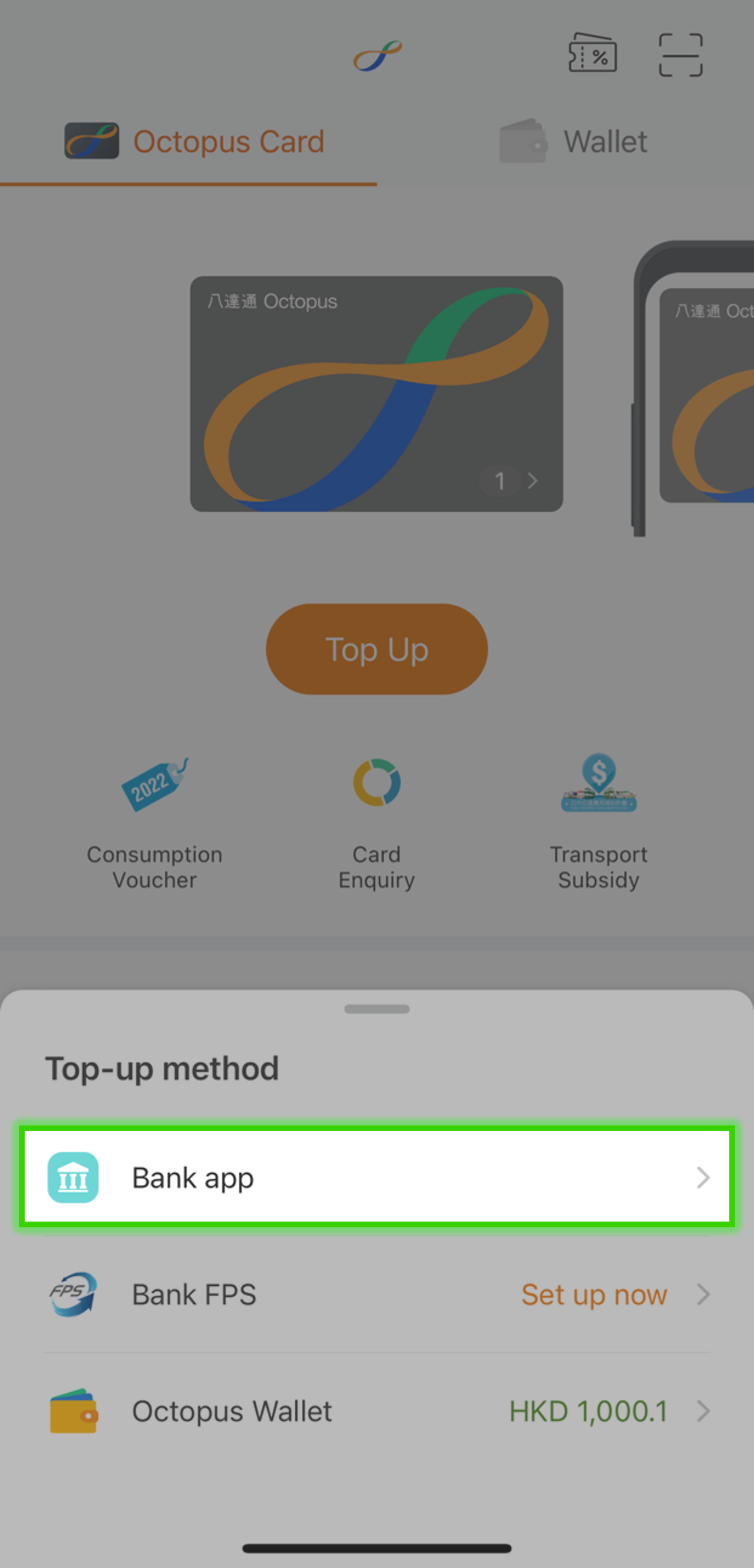
Step 1
-
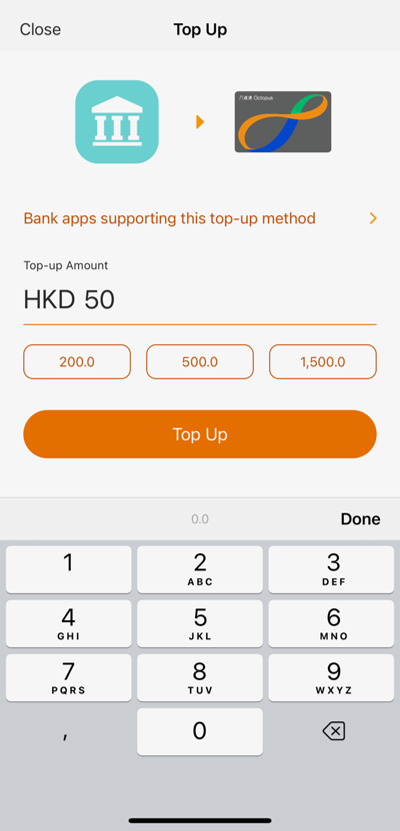
Step 2
Enter top-up amount
-
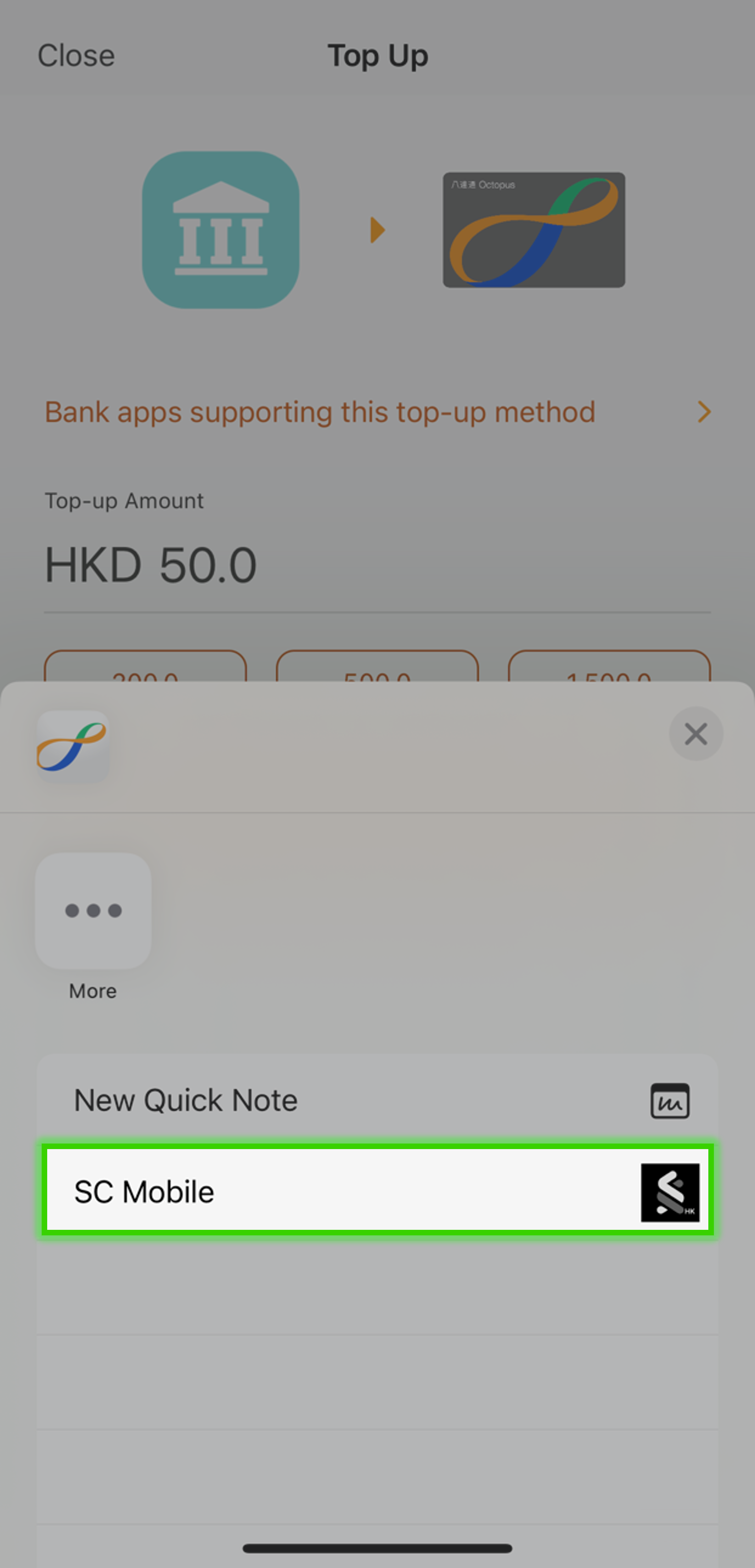
Step 3
Choose ‘SC Mobile’
-
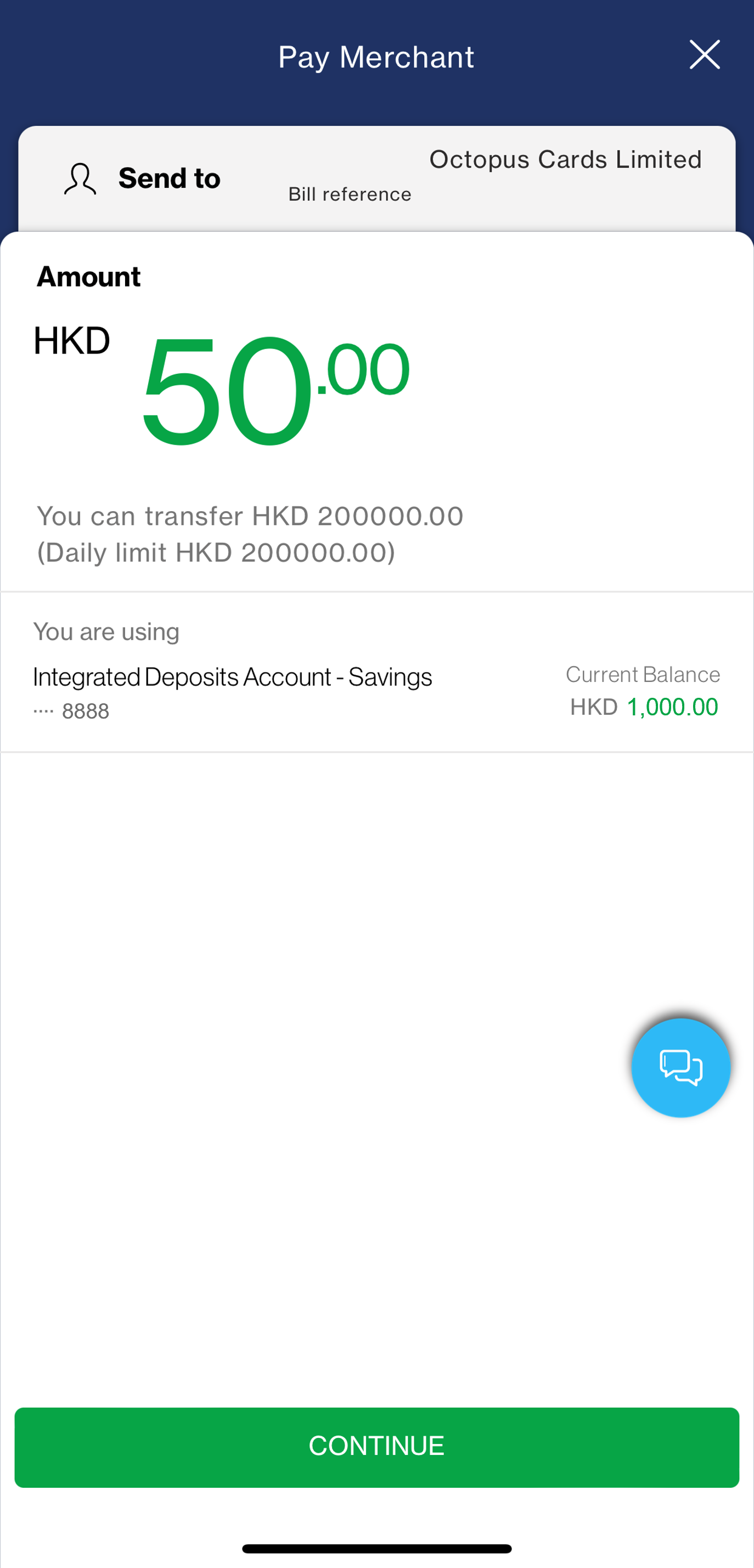
Step 4
You will be directed to SC Mobile App
After login, review the automatically filled-in top-up details
-
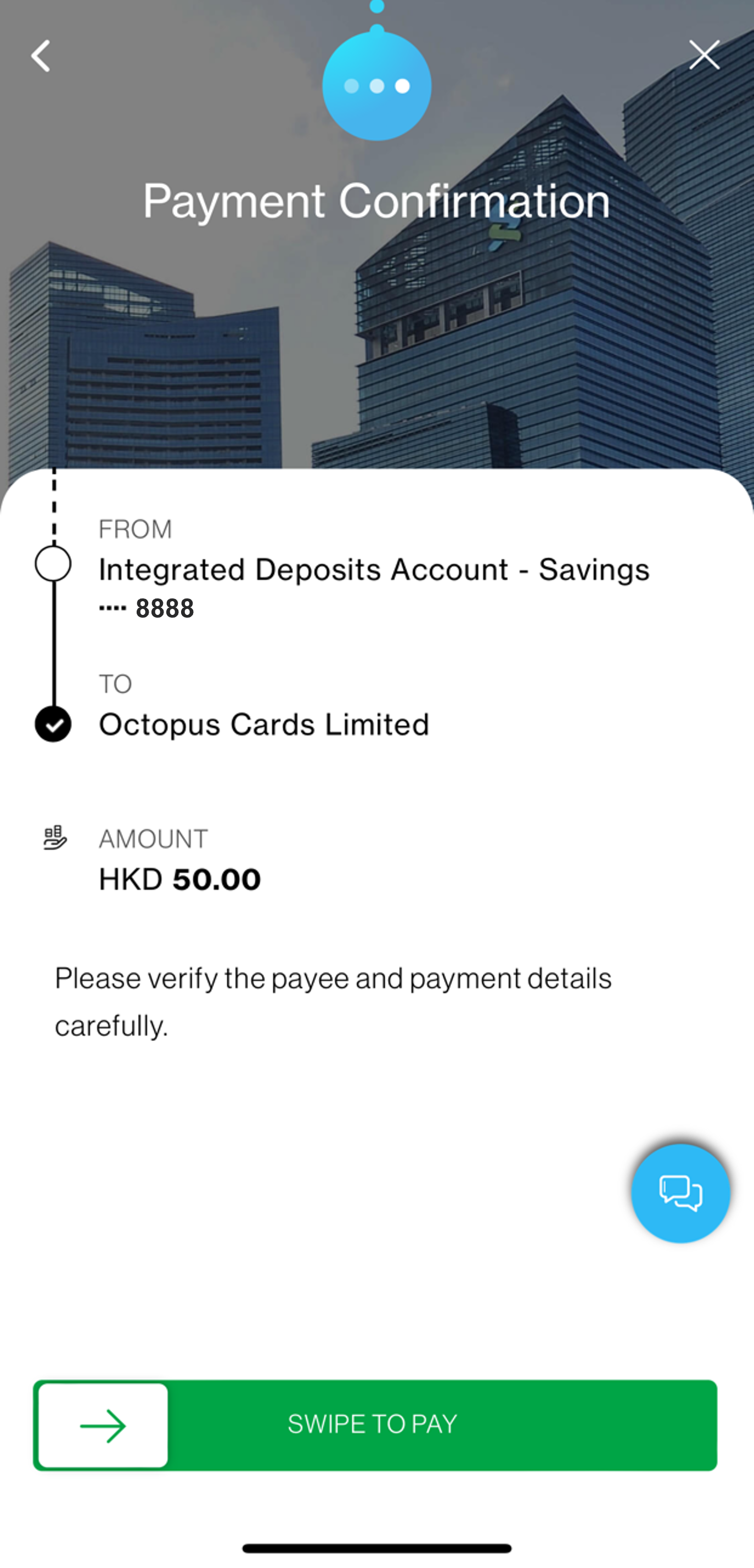
Step 5
Swipe to confirm top-up
-
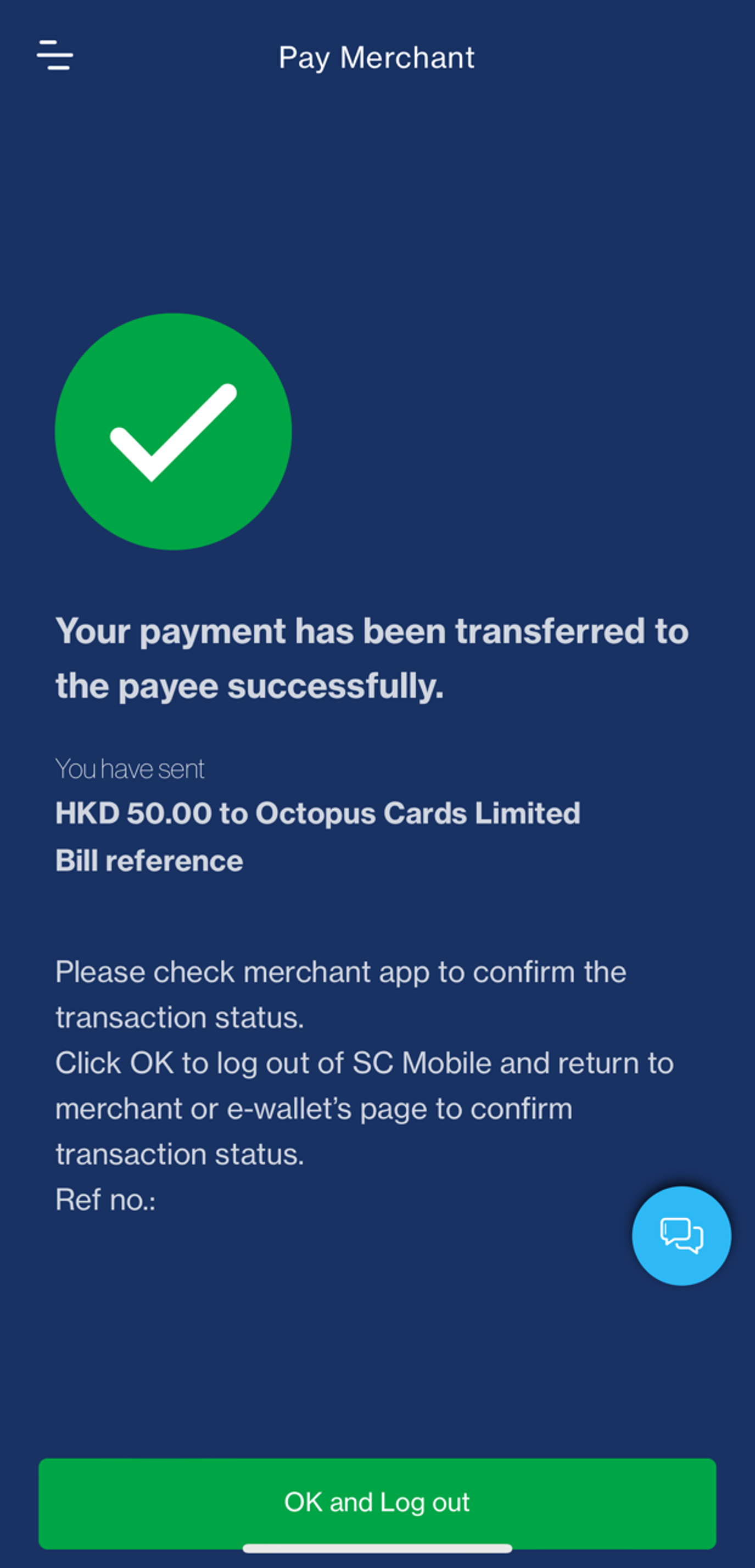
Step 6
You can immediately know whether the top-up is successful
Tap ‘OK and Log out’ for returning to Octopus App
Top up Octopus Card through FPS from Octopus App
Step 1
Step 2
Enter top-up amount
Step 3
Choose ‘SC Mobile’
Step 4
You will be directed to SC Mobile App
After login, review the automatically filled-in top-up details
Step 5
Swipe to confirm top-up
Step 6
You can immediately know whether the top-up is successful
Tap ‘OK and Log out’ for returning to Octopus App
- Add Octopus Wallet for top up
- Top up from SC Mobile App
- Top up from Online Banking
Add Octopus Wallet for top up
-
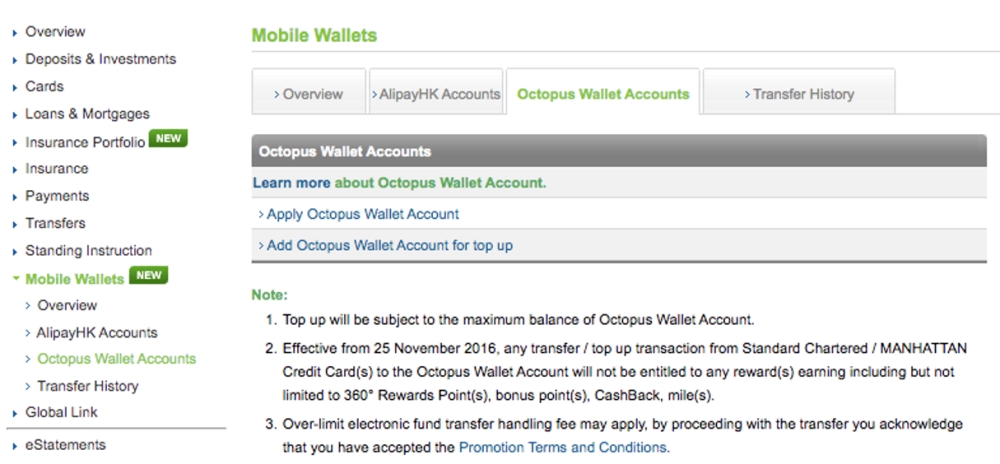
Step 1
Your Octopus Wallet should first be added on Online Banking before top-up.
After login to Online Banking, go to ‘Mobile Wallets’ section. Select ‘Octopus Wallet Accounts’ then ‘Add Octopus Wallet Account for top up’.
-
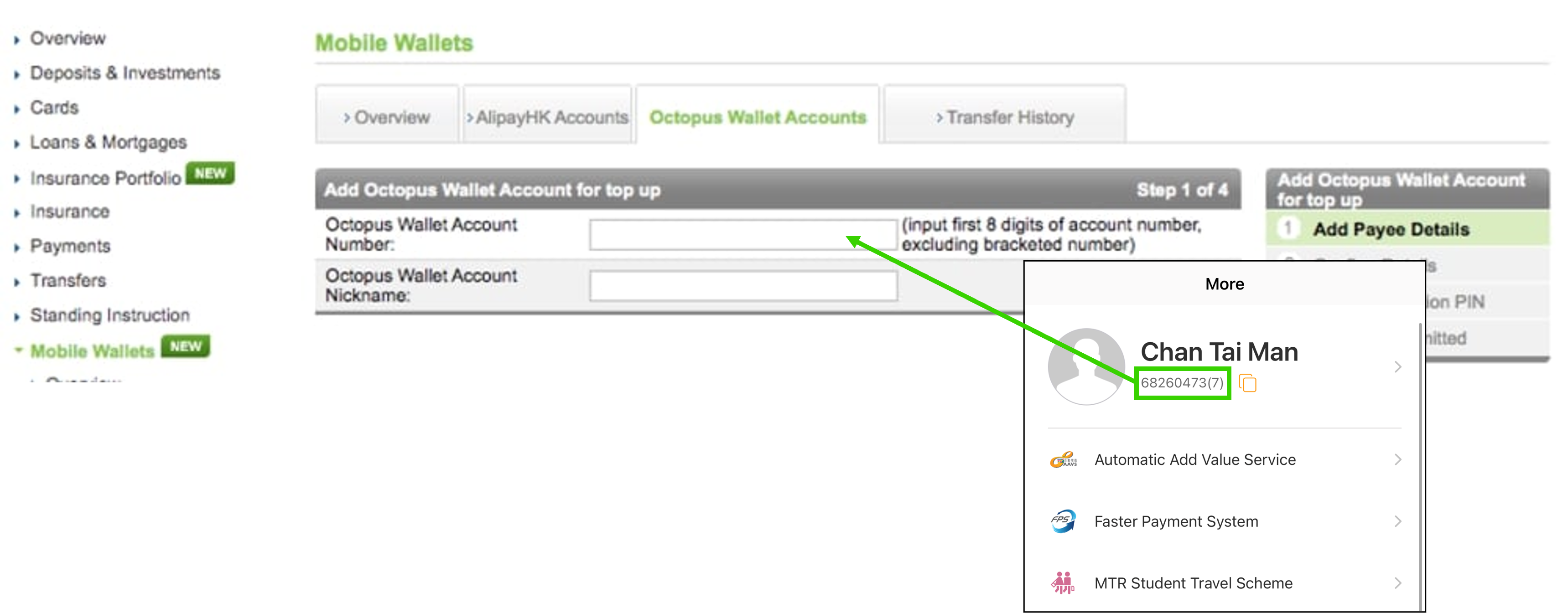
Step 2
Input first 8 digits of your Octopus Wallet account number (excluding bracketed number) and desired Octopus Wallet account nickname.
-
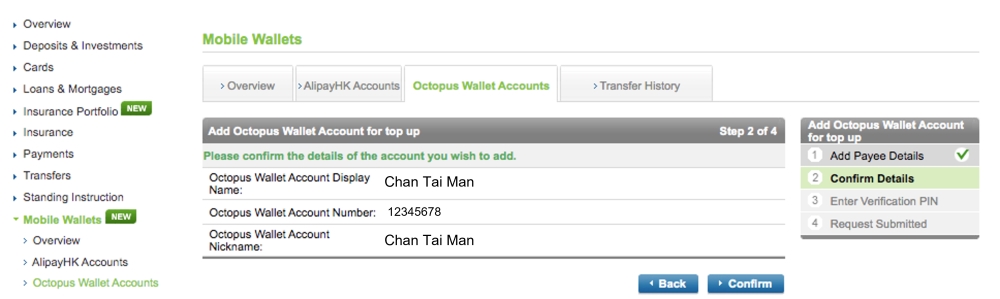
Step 3
Confirm input details and enter verification PIN
-
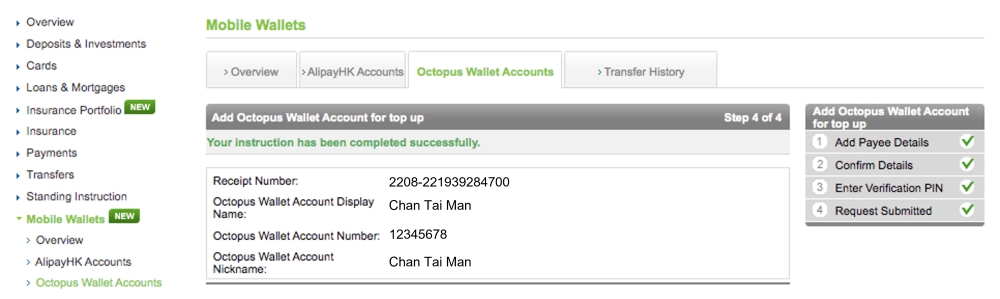
Step 4
Successfully added your Octopus Wallet account in Online Banking
Add Octopus Wallet for top up
Step 1
Your Octopus Wallet should first be added on Online Banking before top-up.
After login to Online Banking, go to ‘Mobile Wallets’ section. Select ‘Octopus Wallet Accounts’ then ‘Add Octopus Wallet Account for top up’.
Step 2
Input first 8 digits of your Octopus Wallet account number (excluding bracketed number) and desired Octopus Wallet account nickname.
Step 3
Confirm input details and enter verification PIN
Step 4
Successfully added your Octopus Wallet account in Online Banking
Top up from SC Mobile App
-
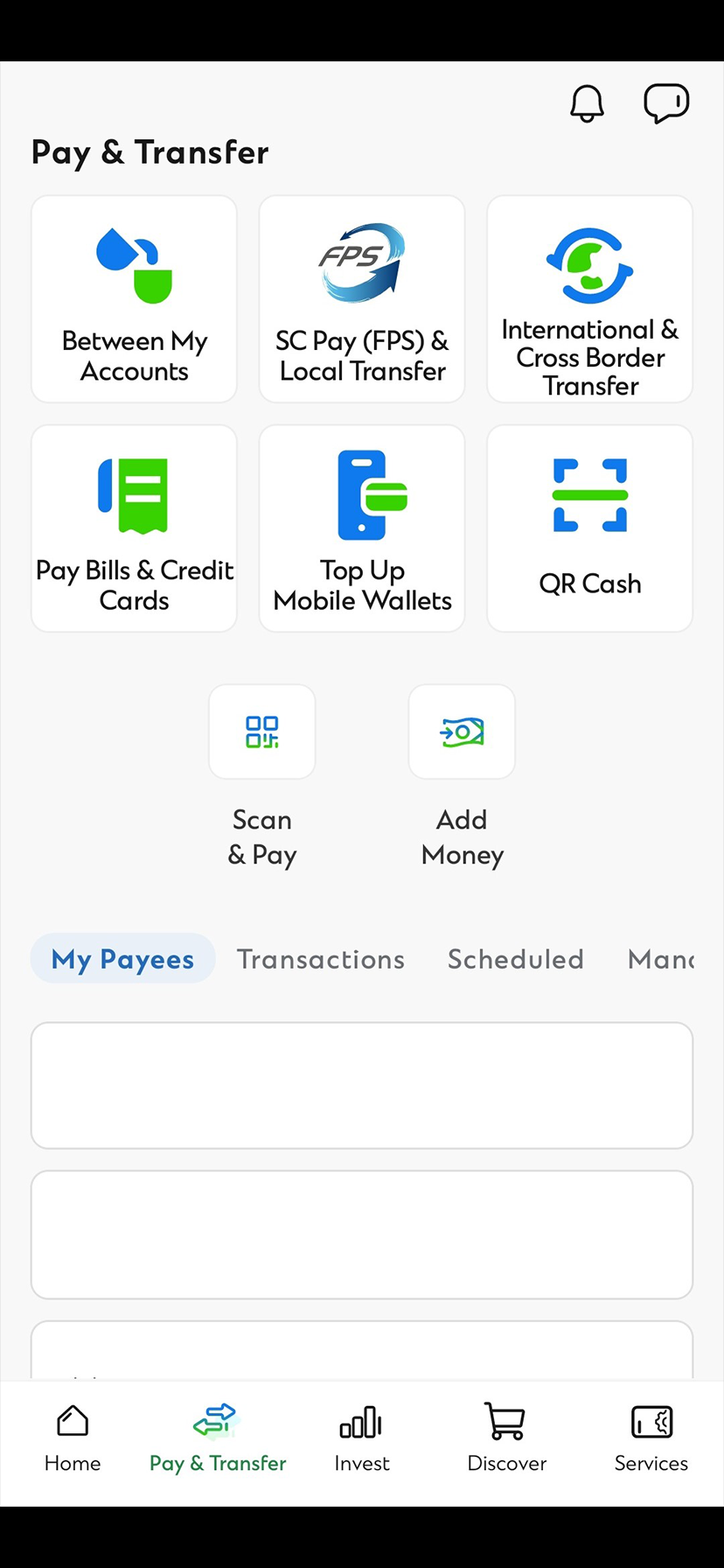
Step 1
Your Octopus Wallet should first be added on Online Banking before top-up
After login to SC Mobile App, go to ‘Pay & Transfer’ and select ‘Top Up Mobile Wallets’
-
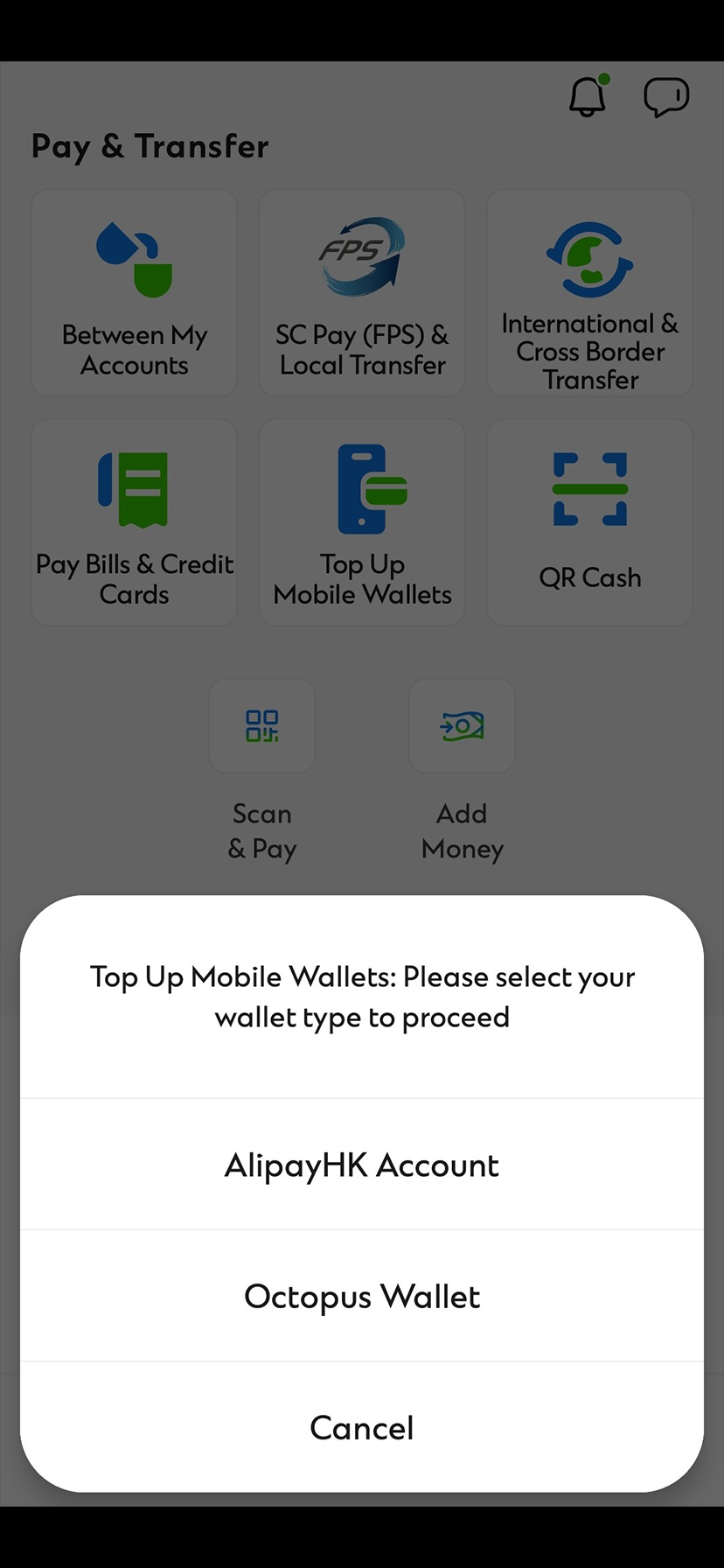
Step 2
Select ‘Octopus Wallet’
-
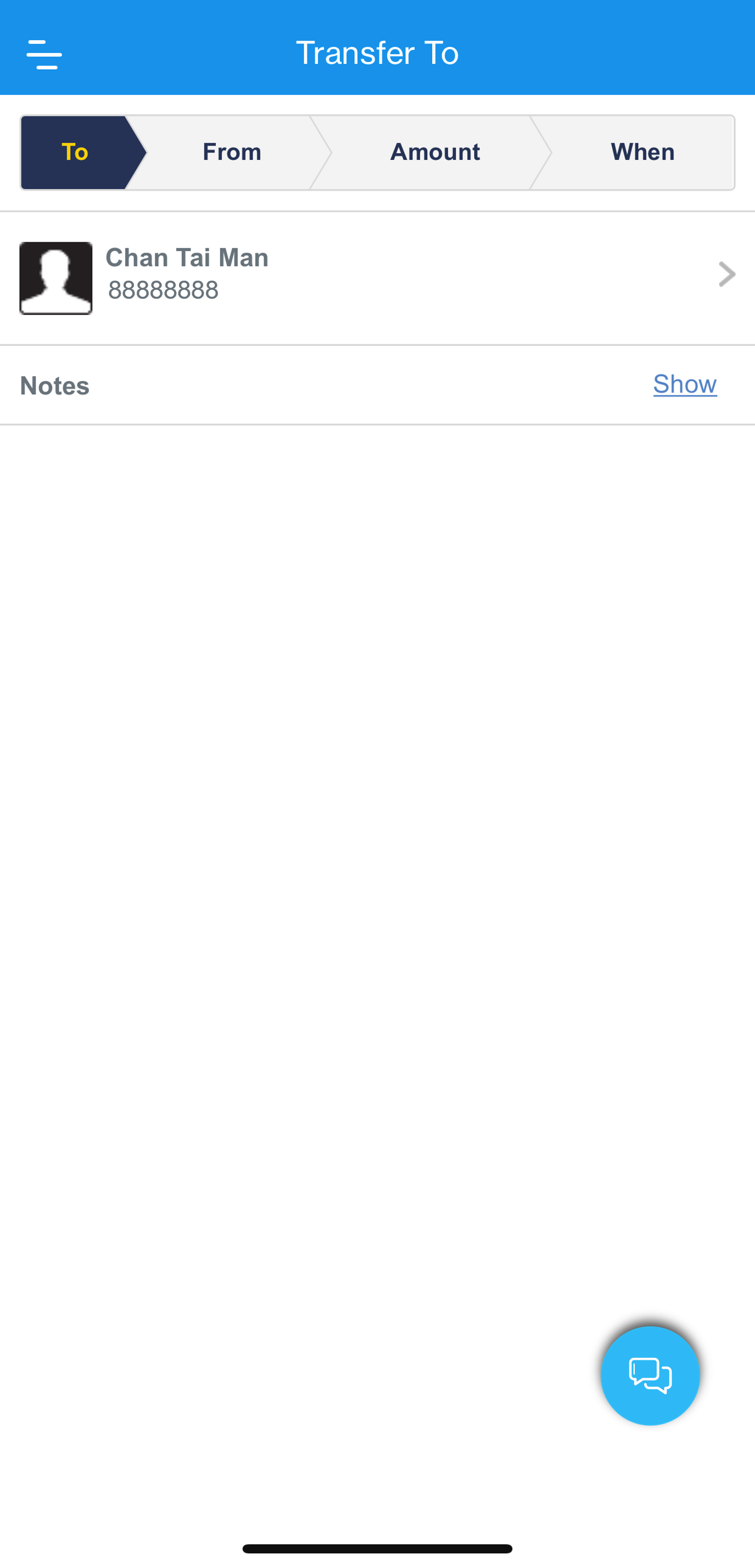
Step 3
Select your Octopus Wallet account
-
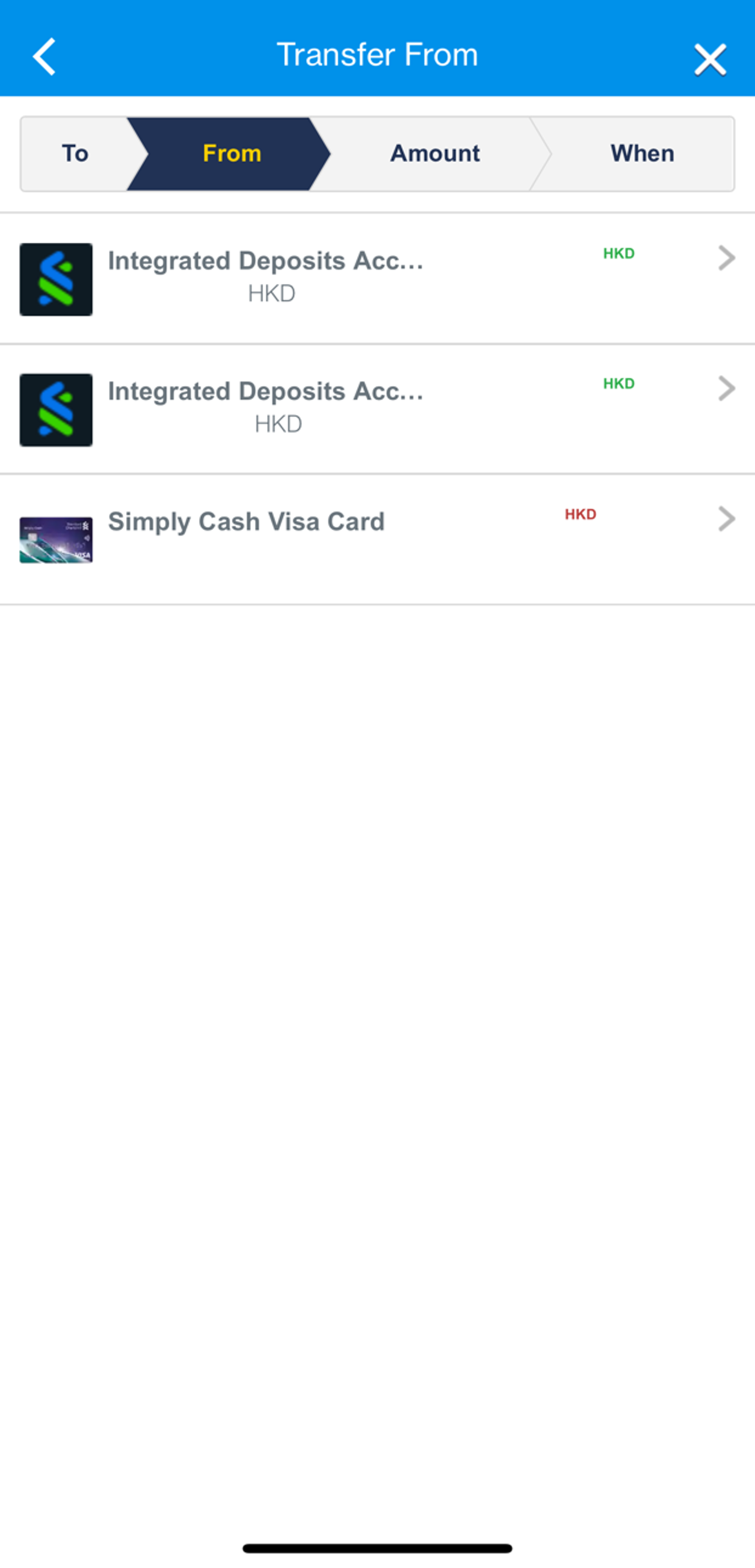
Step 4
Select your source account – you may top up from your current/savings account or credit card
-
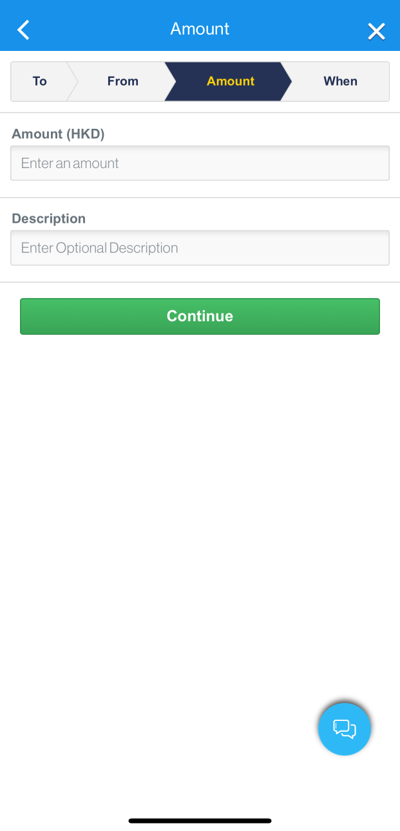
Step 5
Input desired top-up amount
-
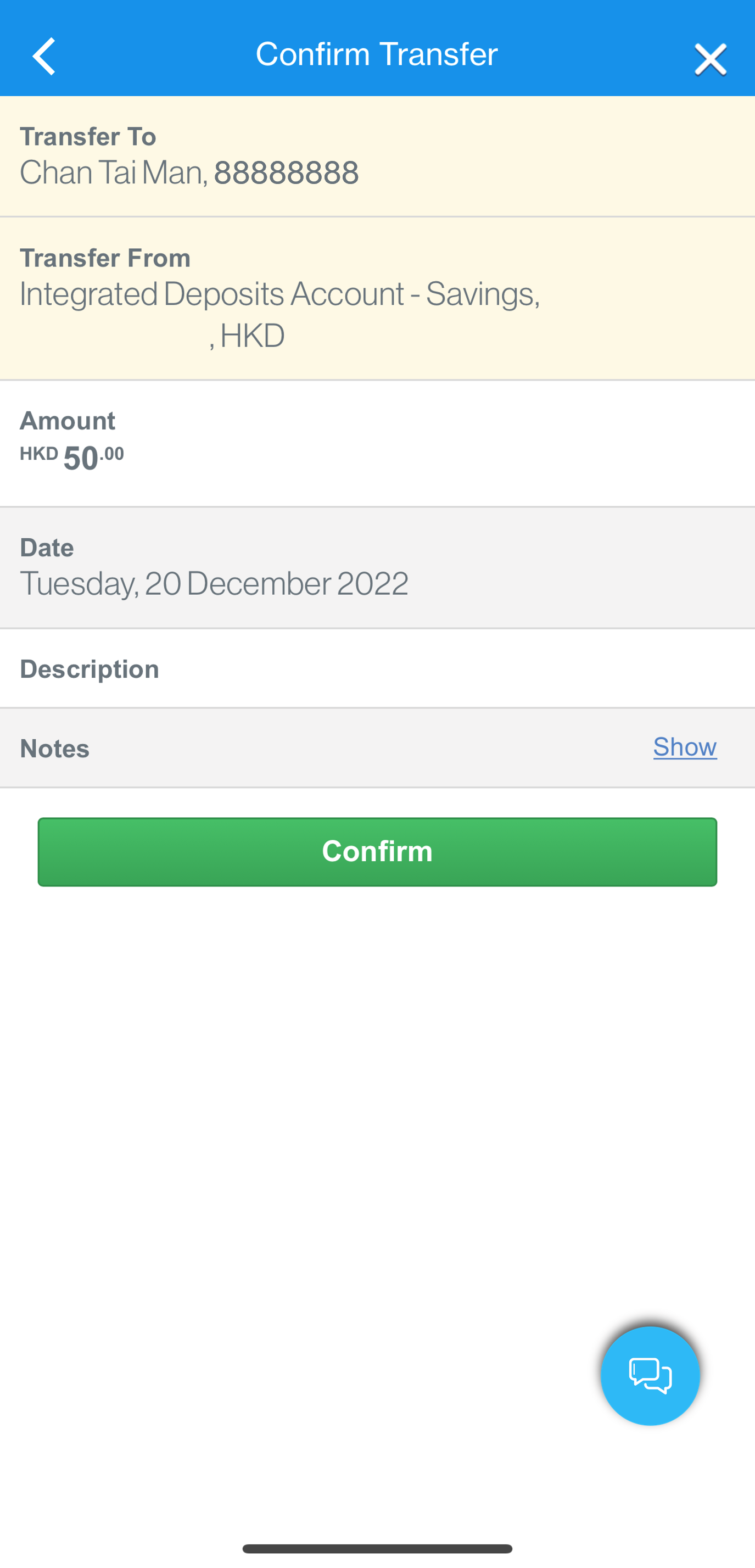
Step 6
After confirming input details, you can immediately know whether the top-up is successful
Top up from SC Mobile App
Step 1
Your Octopus Wallet should first be added on Online Banking before top-up
After login to SC Mobile App, go to ‘Pay & Transfer’ and select ‘Top Up Mobile Wallets’
Step 2
Select ‘Octopus Wallet’
Step 3
Select your Octopus Wallet account
Step 4
Select your source account – you may top up from your current/savings account or credit card
Step 5
Input desired top-up amount
Step 6
After confirming input details, you can immediately know whether the top-up is successful
Top up from Online Banking
-
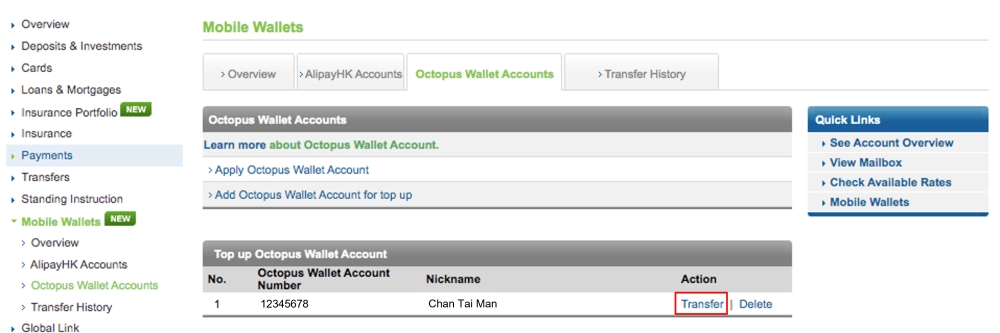
Step 1
Start topping up your Octopus Wallet by clicking ‘Transfer’ under ‘Octopus Wallet Accounts’
-
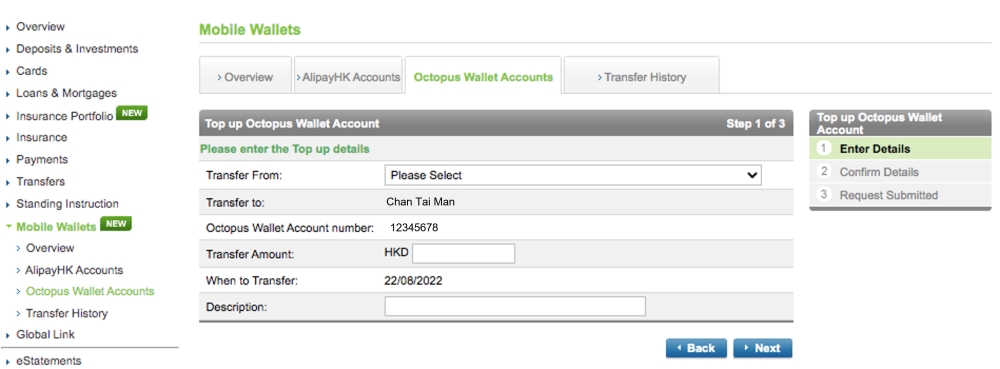
Step 2
Input desired top-up amount and select your source account – you may top up from your current/savings account or credit card
-
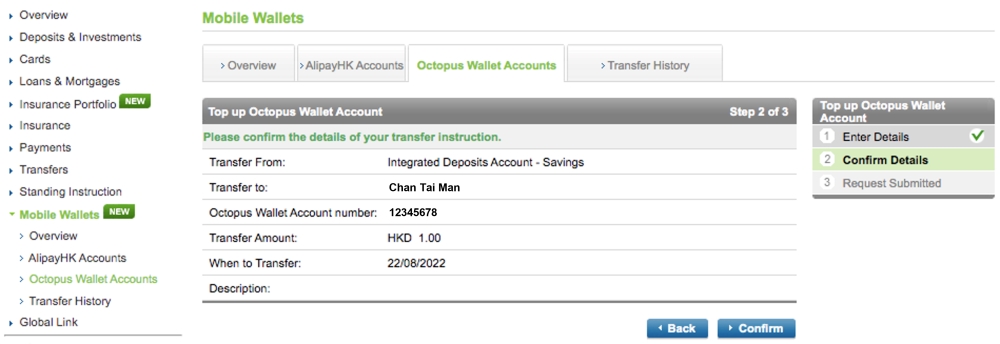
Step 3
After confirming input details, you can immediately know whether the top-up is successful
Top up from Online Banking
Step 1
Start topping up your Octopus Wallet by clicking ‘Transfer’ under ‘Octopus Wallet Accounts’
Step 2
Input desired top-up amount and select your source account – you may top up from your current/savings account or credit card
Step 3
After confirming input details, you can immediately know whether the top-up is successful

Octopus Wallet FAQs
The following accounts can be used to top up Octopus Wallet:
- Single name Current Account or Saving Account (HKD)
- Integrated Deposits Account (HKD)
- Joint name (either-one-to-sign) Current Account or Saving Account(HKD)
- Any Standard Chartered VISA, MasterCard or UnionPay Credit Cards (HKD)
- Any MANHATTAN VISA or MasterCard (HKD)
You can top up Octopus Wallet via the following channels:
- Online Banking
- SC Mobile App
- Octopus App (bank accounts only)
You may add the maximum of 20 Octopus Wallet for top up in Online Banking.
The maximum value depends on the type of your Octopus Wallet and daily transfer limits in Online Banking & SC Mobile App. The minimum value for each top up is HK$1.
Unsuccessful top up will be notified via email and Mailbox.
Any transfer / top up transaction from Standard Chartered / MANHATTAN Credit Card(s) to the Octopus Wallet will not be entitled to any reward(s) earning including but not limited to 360° Rewards Point(s), bonus point(s), CashBack, mile(s).
Need more Help? Find out more on our FAQ
- Octopus Wallet is a mobile payment service provided by Octopus Cards Limited ( “OCL”).
- The stored value facilities monies stored in the Octopus Wallet are NOT protected by the Deposit Protection Scheme in Hong Kong
- Clients acknowledge that the Bank makes no warranty that OCL will be able to perform the functions and services relating to Octopus Wallet ( including Octopus App ) . The Bank accepts no liability for any loss or damage incurred as a result of the use of Octopus Wallet. Application for or use of Octopus Wallet shall be subject to the Terms and Conditions of Octopus Wallet. For details, please visit www.octopus.com.hk. The Bank is not obliged to notify clients of any changes or latest announcements of OCL. Clients understand and accept that the Bank is not the supplier of Octopus Wallet. The Bank shall bear no liability relating to any aspect of Octopus Wallet, including without limitation, their quality, the supply, the descriptions provided by OCL, any false trade description, misrepresentation, mis-statement, omission, unauthorized representation, unfair trade practices or conduct in connection with Octopus Wallet provided by OCL ( including its employees, officer or agent ).
- The Bank reserves the right to alter, revise or terminate the offer and amend the terms and conditions at any time without prior notice. In case of disputes, the decision of the Bank shall be final and conclusive.
- If there is any inconsistency or conflict between the English and the Chinese versions, the English version shall apply and prevail.
Important Notice
Starting from 25 September 2020, application for Octopus Wallet through Standard Chartered Online Banking has been terminated. Please apply via Octopus App. We apologise for any inconvenience caused.
Download Octopus App on App Store
Download Octopus App on Google Play