 Straight2Bank

How to register for Online Banking?
Online Banking registration now uses our SC Mobile app for added convenience!
Click here for more details.
Most of our clients are using Online Banking for…
- View account and credit card balances
- View account transfers
- View credit card transactions
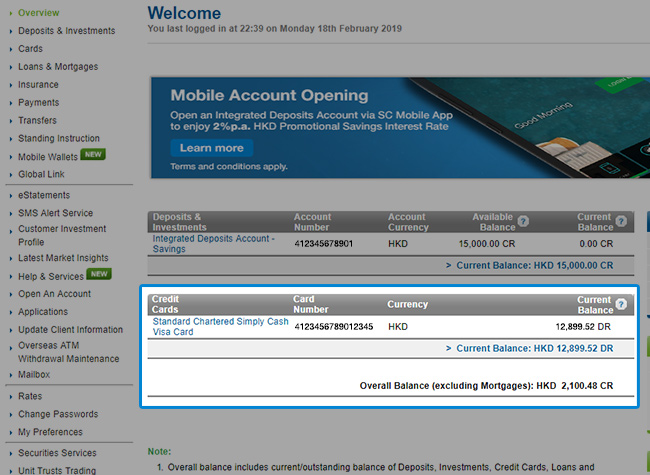
View account and credit card balances
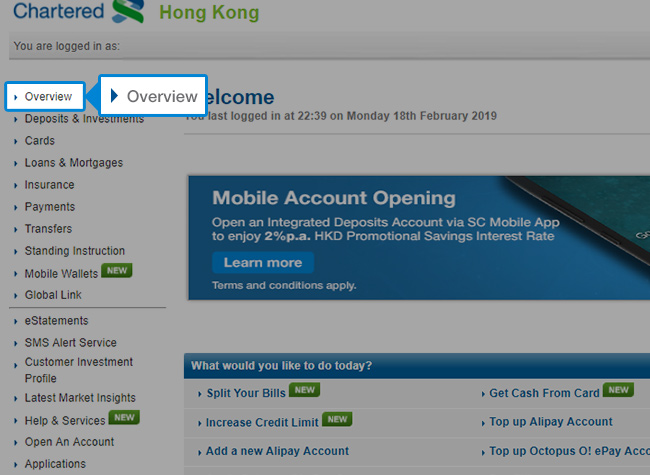
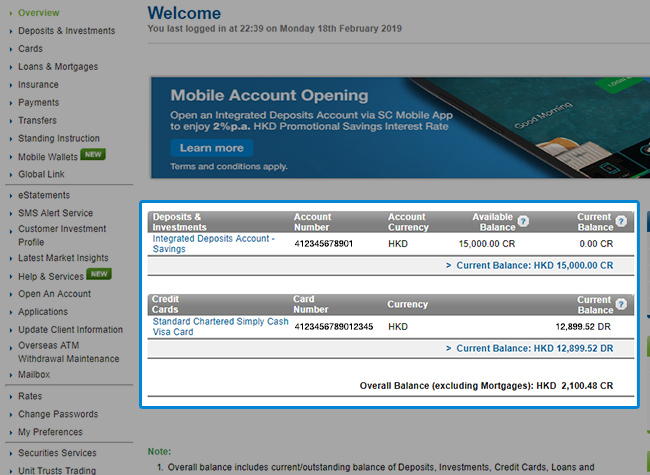
View account and credit card balances
If you wish to view the instruction for SC Mobile App, please click here.
View account transfers
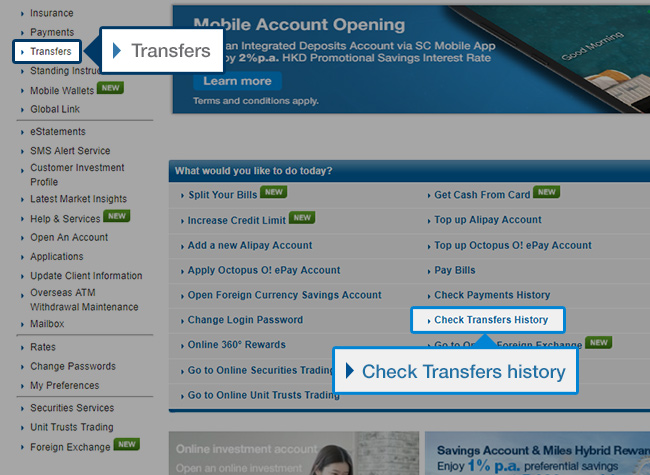
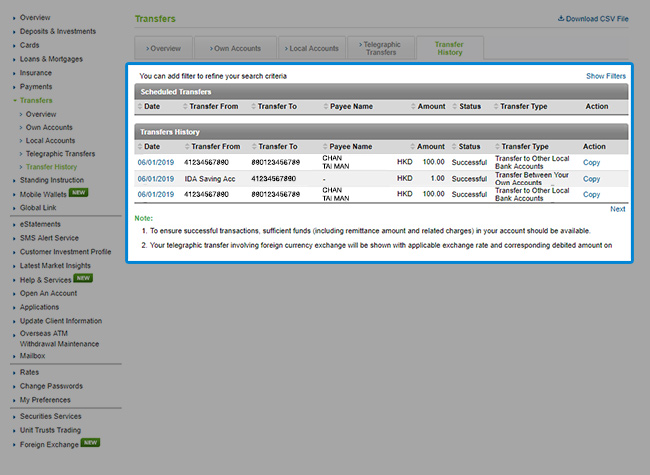
View account transfers
If you wish to view the instruction for SC Mobile App, please click here.
View credit card transactions
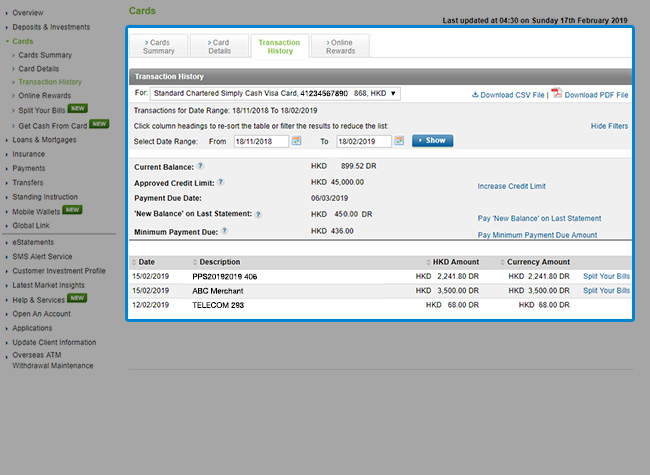
View credit card transactions
If you wish to view the instruction for SC Mobile App, please click here.
Standard Chartered Online Banking
Wide range of banking features designed for your needs




Security tips
Online transactions made safer, more secure and totally hassle-free.
We have adopted comprehensive security measures to safeguard your use of Standard Chartered Online Banking
Customer Authentication with Username and Password
Your Standard Chartered Online Banking account can only be accessed with your unique Username and Login Password.
Strong End-to-end Encryption
All information transmitted through the Internet, including your Username, Password, account information and transaction details, from the moment you log-in to the moment you log-out, are protected by strong end-to-end encryption.
Automatic Logout
To prevent unauthorized access at your PC while it is not attended, we have implemented an automatic time-out feature. The system will time-out if there are no screen page changes for 15 minutes. Your Username and password must therefore be re-entered should you wish to continue using Standard Chartered Online Banking.
General FAQs
Phone Banking Card is the designated ATM Card or Credit Card that has been registered for Phone Banking services. Tele-electronic Identification Number (TIN) is your Phone Banking services password.
Please visit any branches or call us at (852)2886-8888 to request.
Standard Chartered Online Banking is an innovative and comprehensive online banking service tailored to serve your changing financial needs. With Standard Chartered Online Banking, you can enjoy more convenient and round-the-clock banking services ranging from day-to-day account transfer transactions to valuable financial information, which enable you to manage your finance anytime anywhere.
- Hong Kong Dollar Savings/ Current/ Time Deposit Accounts
- Renminbi Savings/ Time Deposit Accounts
- Foreign Currency Savings/ Current/ Time Deposit Accounts
- Mortgage/ Personal Loan Accounts
- Credit Card Accounts
- Investment Accounts
Standard Chartered Online Banking is free to customers with valid Standard Chartered Tele-electronic Banking Services or ATM Card Services*. However, please note that use of some services such as request for credit card statement and, Telegraphic Transfer are subject to corresponding service charge.
* Setting up of Tele-electronic Banking Services or ATM Card Services for your Credit Card, Click-a-Count or relationship package (Easy Banking/Personal Banking Privileged Plan/Priority Banking) will be free of charge. Otherwise, it will be subject to an annual fee. Please refer to “Service Charges” for details.
All the Web pages can be viewed in Traditional Chinese, Simplified Chinese or English.
You must register Standard Chartered Online Banking with our SC Mobile App. Simply use your ATM/Debit Card Number and your ATM PIN, your Credit Card Number and your Credit Card PIN, or your Credit Card Number without PIN to register Standard Chartered Online Banking.
After registration of “Username” and “Password” with your credit card without PIN, you can login Online Banking to see your credit card details such as transaction history, payment due date, amount and 360° Reward Points, subscribe for/view your credit card eStatements and set up SMS alerts. If you need to access other Standard Chartered Online Banking services, or your Standard Chartered bank accounts, you will need to re-register for Online Banking using your ATM/ Debit Card and PIN, or your Credit Card and PIN.
Your online banking registration count will be locked after several incorrect inputs of above personal credentials during online banking registration. Personal customers: please contact our customer service hotline to arrange unlock. SME customers: please download applicable forms and mail the completed forms to the Bank or drop them at any of our branches for processing. Upon receipt and confirmation, your request will be processed within 3 working days.
You must receive a One-time Password via your mobile phone number in the Bank’s record and complete 2-Factor Authentication before defining your Standard Chartered Online Banking or Credit Card Online Username and Password. After registration, you may login the services using your self-defined Username and Password.
Please visit any branches to request.
That is your self-defined 8-16 characters Standard Chartered Online Banking or Credit Card Online Username & Password.
You must re-register your “Username” and “Password” with your ATM/Debit Card Number and PIN, your Credit Card Number and your PIN, or your Credit Card Number without PIN via SC Mobile App. You must receive a One-time Password via your mobile phone number in the Bank’s record and complete 2-Factor Authentication before defining your Standard Chartered Online Banking or Credit Card Online Username and Password.
Yes, you can login to Standard Chartered Online Banking and change your Password anytime to ensure security.
If you suspect that your Password has been stolen or exposed to others, please call our Customer Service Hotline at (852)2886-8868 (Press 2,6,0 to talk to our Customer Service Representative) to terminate your access immediately.
Should you encounter any difficulties during login, please call our Customer Service Hotline at (852)2886-8868 (Press 2,6,0 to talk to our Customer Service Representative).
You will benefit from the most comprehensive range of services in many ways:
- Account Information – Your account balances and status of your issued cheques are just a few clicks away!
- Fund Transfer and Payment – Experience the ultimate convenience, especially when it comes to transferring funds, making payments and even Telegraphic Transfer to third parties.
- Investment Services – Enjoy all the choices, information, analysis and flexibility of our all-rounded Investment Services.
- Card Services – No more troubles in making card payments or checking your card balances and 360° Rewards Points with Standard Chartered Online Banking.
- Online Applications – You can now even open new accounts and apply for our insurance, loans and credit cards easily from home and at your own convenience!
- Personal Update – Keep us posted of any changes to your personal details and plans whenever you wish.
- Market Watch – Deposit, lending and foreign exchange rates, market movements, and professional economic trends are at your fingertips all day through.
- e-Statement – Not only reduce paper consumption, you can also retrieve your last 12 months’ statement at online.
You can enquire on your account balance, transfer funds in same currency, pay bills and conduct credit card-related transactions at anytime when you are online with us. Foreign currency exchange related services are available from 9:00a.m. to 9:00p.m. on weekdays and from 9:00a.m. to 1:00p.m. on Saturdays, excluded Sundays and public holidays, just the same as normal market hours.
You can check all the accounts under your name, whether in your sole name or in the joint names with others.
However, if you are first time login to Standard Chartered Online Banking, your credit card transaction records, loan transaction records and SME (Small-Medium Enterprise) accounts will be available in online banking on the next business day. Meanwhile, please call our Customer Service Hotline for transaction history or account information.
- Deposit Account – 1 year
- Standard Chartered Credit Card – 90 days
- MANHATTAN Credit Card – upto last 2 months’ statements and billed transactions
- Loan & Mortgage – 1 year
Transactions made with your deposit accounts after 11pm or on holidays will be shown from the following business day. Balance in corresponding Standard Chartered deposit account(s) will be updated immediately.
Payments to/from your credit cards will be shown after 1 or 2 business days.
You could visit our branch with the required documents or login to Online Banking / Mobile Banking to open an account. Please see the requirements and documents needed here and the overview on Client Due Diligence here.